

Valheim Seed Viewer: Finding the Perfect World for Your Viking Saga
Type any seed into the map above and it draws that world as Valheim 1.0 generates it: every biome, the oceans, rivers and lakes, the mountains, each biome's share of the land, and where the spawn, the bosses and the traders are. Click to zoom in, hover to read the biome and the world position, and copy a link to share the seed with your group. Below the map, the curated list collects community seeds with notes on their starts and bosses.
So, you're hooked on Valheim. Sailing the seas, battling trolls, building epic longhouses - it's all awesome. But the world you spawn into can make or break your Viking experience. Sometimes you're stuck with a swampy start, or maybe the boss locations are just plain awful. That's where a Valheim seed viewer comes in clutch.
How the seed map works
The map is calculated in your browser, the same way the game calculates a new world: nothing is uploaded, and it works for seeds nobody has played yet. We checked it against a real Valheim 1.0.17 dedicated server on twelve seeds. The server's own world generator and the map agreed on all 916,524 points we compared, every biome and every terrain height, as well as on every lake and river and on the stream network. Water is everything below the game's sea level, which is why rivers and lakes show up as they do in game.
A few seconds after the terrain, the map also marks the spawn stones, every boss and the three traders, placed the way the game places them. On eight seeds we compared those placements with the ones the 1.0.17 server made: all 518 places per seed came out identical. Each boss appears in several places and all of them stay. A trader has ten possible spots: it appears at the first one your group comes close enough to load, and the game then removes the others. Dungeons and smaller places are not marked. The spawn stones go near the centre of the world, because the game searches outward from the centre for a nearly flat Meadows spot at least 3 m above the sea; on the eight curated seeds the spawn was between 6 m and 446 m from the centre. When you have picked a seed, you can set it as the world seed for a new world on a Valheim server with Supercraft.
Will your seed survive Valheim 1.0 and the Deep North?
A seed gives the same world every time on the same version of the game, so a seed you pick on 1.0 stays the same world for as long as the world generator does not change. Seed notes written before 1.0 are another matter. Valheim 1.0 arrived on 9 September 2026 with the Deep North, and we generated all eight curated seeds on a 1.0.17 dedicated server and measured where the game put the spawn, the first three bosses and the traders. Most of the boss distances in the older notes no longer hold:
| Seed | Spawn | Eikthyr | The Elder | Bonemass | Traders you can walk to |
|---|---|---|---|---|---|
| cE2hh4DhGT | 189 m from the centre | 583 m E, walk | 2.2 km NW, boat | 3.2 km SW, boat | none |
| HHcLC5acQt | 446 m from the centre | 440 m E, walk | 2.9 km SW, walk | 2.2 km W, walk | Haldor 1.6 km, Hildir 3.0 km |
| xtraNL55hQ | 125 m from the centre | 270 m NE, walk | 2.0 km E, boat | 3.7 km NE, boat | Haldor 2.1 km, Bog Witch 4.2 km, Hildir 4.5 km |
| BloodEagle | 7 m from the centre | 338 m W, walk | 2.2 km NE, boat | 2.3 km W, boat | none |
| IronGate | 122 m from the centre | 334 m E, walk | 2.0 km SE, walk | 3.3 km SE, boat | Bog Witch 3.4 km |
| XmasGift | 6 m from the centre | 305 m NE, walk | 2.4 km NW, boat | 3.1 km E, boat | Haldor 1.6 km |
| nooo | 7 m from the centre | 197 m NW, walk | 2.7 km NE, walk | 2.8 km S by boat, 3.8 km on foot | Bog Witch 3.4 km, Hildir 4.4 km |
| Hobbiton | 60 m from the centre | 268 m NE, walk | 1.6 km NE, boat | 2.8 km, walk | Haldor 2.8 km, Bog Witch 3.1 km, Hildir 4.1 km |
Each figure is the nearest of the several altars or camps the game places, measured from the spawn stones. "Walk" means a land route exists, counting wading and short swims across rivers and channels up to about 100 m wide; "boat" means wider water in between. Two seeds still play well on foot: on nooo the nearest Moder altar is 3.9 km away overland as well, and on Hobbiton it is only 1.2 km west of the spawn.
Some old notes could not be right on 1.0 at all, because the world generator ties biomes to distance from the centre of the world: Swamp only appears between 2 and 6 km out, Plains between about 3 and 8 km, and the Mistlands between about 6 and 10 km. No seed has Swamp or Plains within 1.5 km of a spawn near the centre, or Mistlands 3 km away. The curated cards keep their original community notes; read them as descriptions from older versions, with the table above as the 1.0.17 measurement. For worlds you already play, see what happens to existing worlds at 1.0, and for the update itself our Valheim roadmap 2026 and the 1.0 launch checklist for server admins.
What is a Valheim seed?
A Valheim seed is a string of characters (letters + numbers) that determines exactly how the procedural world is generated. Same seed = same world layout, every time. Two players who spawn into the same seed will see identical biomes, identical boss locations, identical sea routes. The seed system is deterministic, so curated lists like the one above let you preview a world before committing 200 hours to it.
Why use a seed viewer?
Because procedurally-generated worlds are random - and "random" includes frustrating. Default first-spawn seeds are sometimes:
- Spawn island with no Black Forest within reachable distance, blocking the entire early game
- Bonemass swamp parked behind a 2km ocean voyage
- Mistlands clustered on the far side of the map, requiring an epic karve voyage
- Mountain biomes packed with no flat building space
The curated seeds above were submitted by the community after dozens of playthroughs and chosen specifically because they avoid those frustrations. Each one is good at a particular playstyle - pick the one that fits your group.
How to use a seed in Valheim
- Start a new world. In the world setup screen, click "Show seed."
- Paste the seed exactly. Valheim seeds are case-sensitive -
HHcLC5acQtandhhcl5acqtare different worlds. Click any seed card above to copy the exact code. - Generate. The first world generation takes 30-60 seconds. Subsequent loads of the same seed are instant.
- Spawn matches the curated layout. Verify by checking the spawn island shape against the seed description above.
Already have a world? Read its exact seed from the world file
If you (or a friend, or a server) already generated the world and nobody wrote the seed down, the seed is stored in the world's metadata. Since Valheim 1.0 (September 9, 2026) a world is a folder named after it and the metadata is the _main.<n>.fwl2 file inside that folder; a world last played before 1.0 is still the single <WorldName>.fwl file. Drop the world folder, the .fwl2 or the .fwl below - it is read in your browser, nothing is uploaded anywhere.
- PC (local worlds):
C:\Users\<you>\AppData\LocalLow\IronGate\Valheim\worlds_local\<WorldName>\is the 1.0 world folder; an older save is...\worlds_local\<WorldName>.fwl. - Supercraft server: File Manager, Game Data, folder
worlds_local(over FTP:vlh/Valheim/save/worlds_local/). Download the<WorldName>folder, or just its newest_main.<n>.fwl2. - Other Linux dedicated servers:
~/.config/unity3d/IronGate/Valheim/worlds_local/.
Drop a world folder, a _main.<n>.fwl2 or a .fwl here
or
Reads the world name, seed, save version and world modifiers locally. Nothing leaves your device.
Six seeds rendered from the game's own world generator
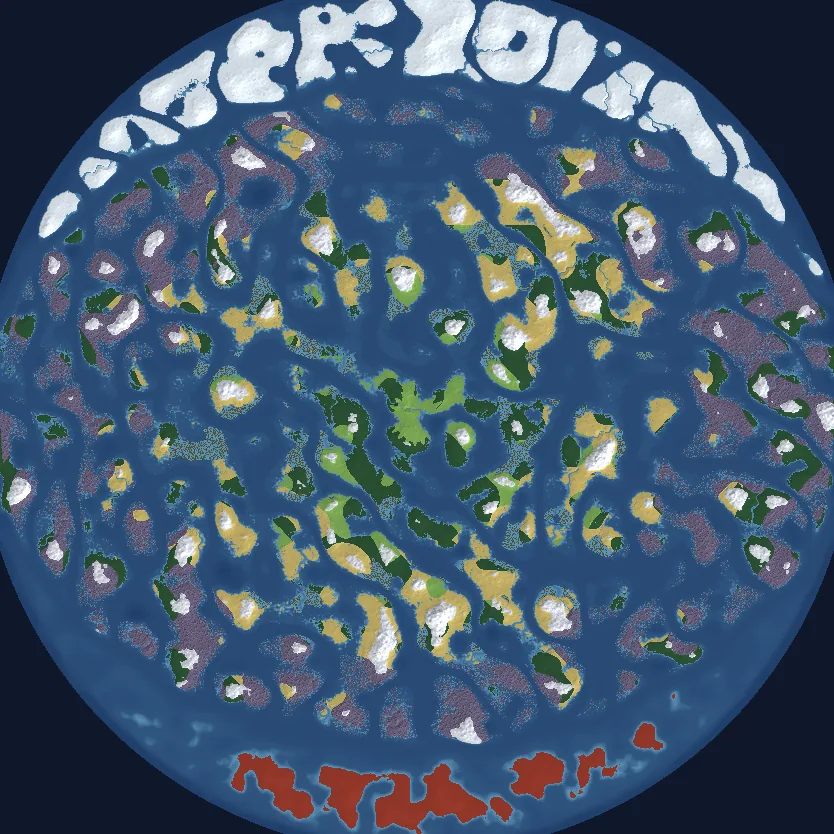
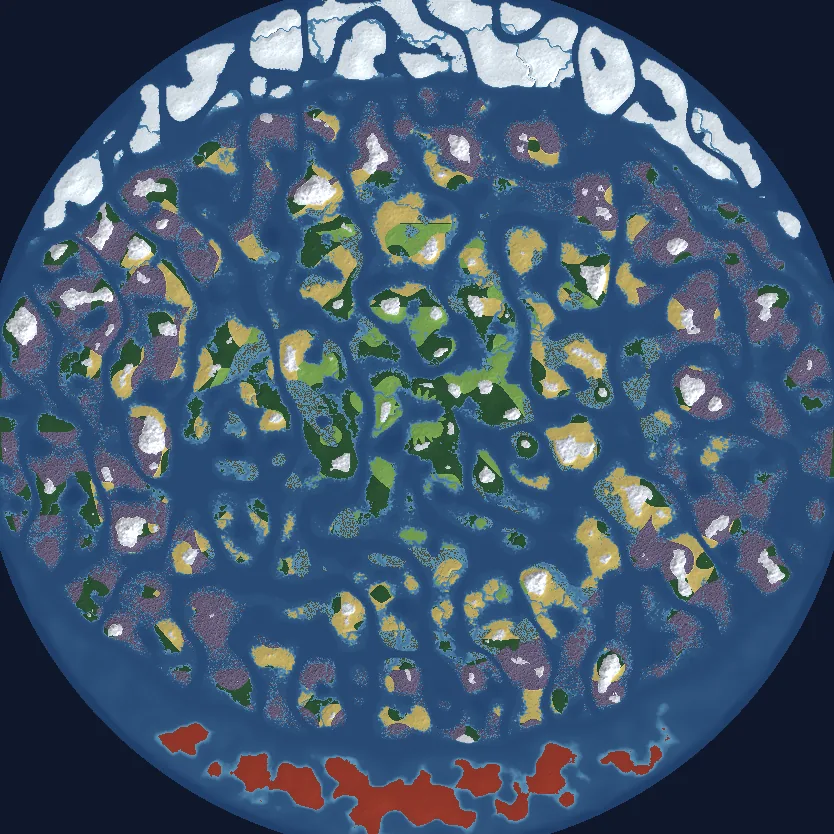
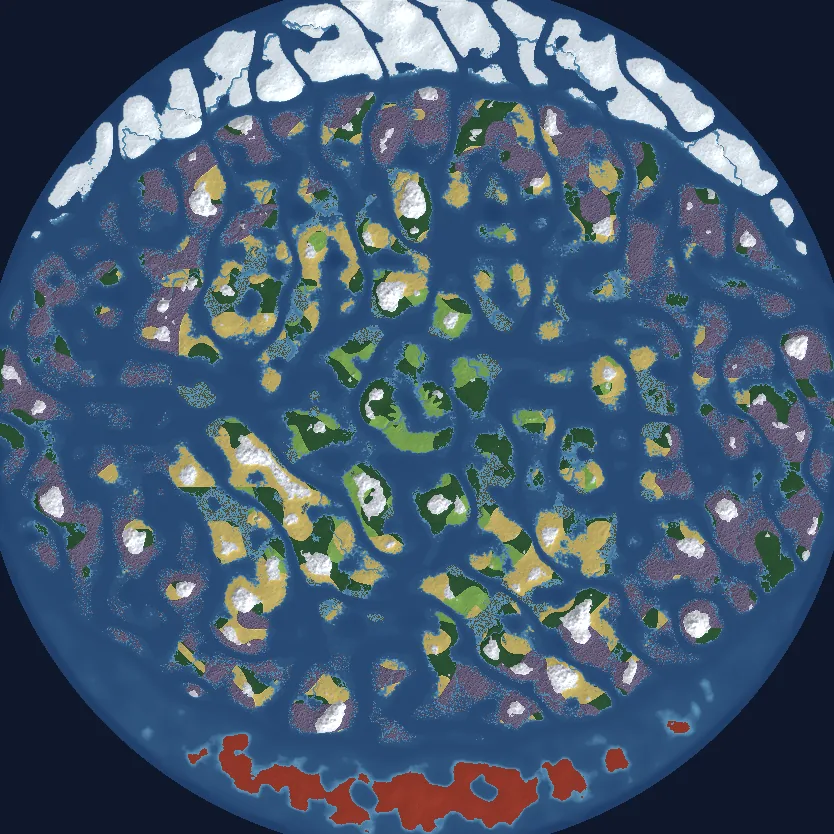
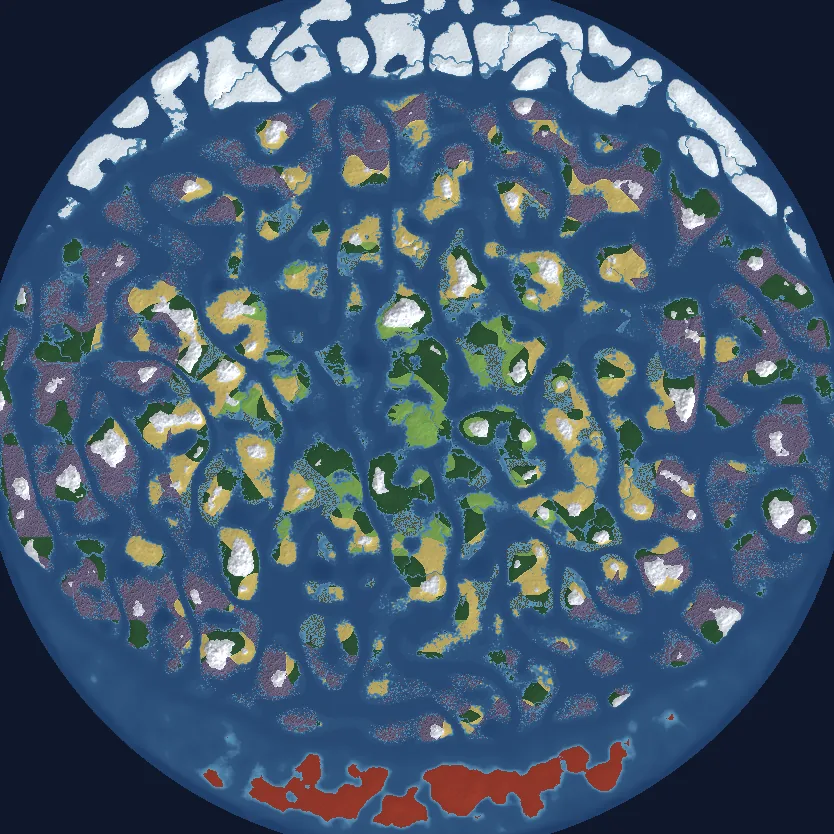
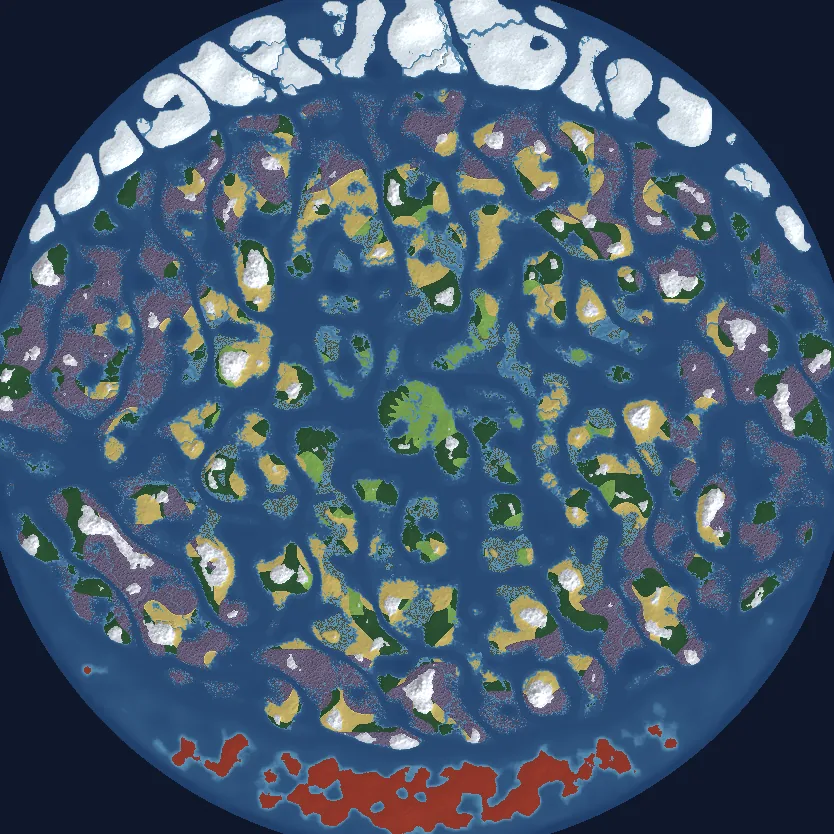
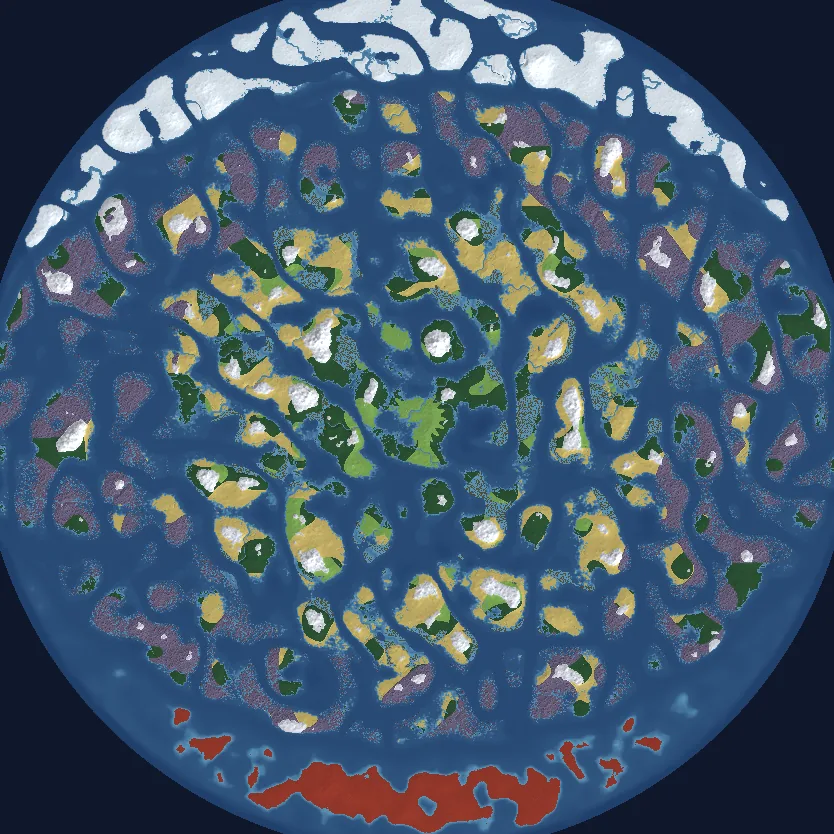
Every seed list says a seed gives you a different world. We measured it. The map above sampled six worlds every 24 metres across the whole 10 km disc (545,436 points per world, on Valheim 1.0.17) and every number here is counted from the same points as the pictures. Click a map to open that seed above, with the spawn, the bosses and the traders marked.
North is up. Water is blue in every biome, lighter in the shallows. Land is coloured by biome: light green Meadows, dark green Black Forest, olive Swamp, pale grey Mountain, tan Plains, purple Mistlands, white Deep North, red Ashlands.
What the numbers say a seed changes, and what it never changes
The biome budget barely moves between seeds, because the game places biomes by distance from the centre of the world. Ashlands was 9.5% of every world, and the same 9.5%: its border depends on position alone, and the game checks for it before it checks for sea, so no seed moves it. Only about 36% of a world is dry land (35.4% to 38.7%), and no land biome moved by more than two points between seeds. What a seed changes is where things are, not how much of each thing you get:
- Spawn is always Meadows near the centre, 3 m to 344 m from it in these six.
- Black Forest never starts within 500 m of the centre, so it was 201 m to 529 m from spawn.
- Swamp only grows between 2,000 m and 6,000 m from the centre, so the nearest was 1,660 m to 1,997 m from spawn.
- Deep North is always north, Ashlands always south, each beginning about 8,000 m from the centre.
| Seed | Dry land | Ocean | Ashlands | Mistlands | Black Forest | Plains | Deep North | Mountain | Meadows | Swamp |
|---|---|---|---|---|---|---|---|---|---|---|
| HxNkPvJq2W | 35.7% | 27.7% | 9.5% | 18.5% | 14.4% | 13.3% | 7.0% | 3.8% | 3.3% | 2.6% |
| Ylw3TqBm8R | 35.8% | 26.3% | 9.5% | 19.5% | 13.6% | 14.1% | 6.6% | 3.4% | 3.8% | 3.1% |
| Kd7ZpVnA4C | 36.5% | 26.9% | 9.5% | 19.3% | 13.6% | 14.2% | 7.1% | 3.4% | 3.4% | 2.7% |
| Mq9BsRtE6X | 35.4% | 26.2% | 9.5% | 18.4% | 14.7% | 14.9% | 6.4% | 3.5% | 3.4% | 2.9% |
| Pf2WjLhU5N | 38.7% | 24.8% | 9.5% | 18.8% | 15.0% | 14.6% | 7.1% | 3.6% | 3.3% | 3.4% |
| Tc6RyDkG3V | 35.6% | 28.1% | 9.5% | 18.0% | 14.1% | 15.3% | 6.2% | 3.2% | 3.0% | 2.6% |
Each biome column includes the rivers and shallow water inside that biome, and for Ashlands its whole sea; Ocean is the open sea between the islands, and dry land is everything above sea level. So if you are seed-hunting for "less Ashlands", you will not find it, and "more Plains" gets you two points at most. What is worth hunting for is layout: how close your first Black Forest and Mountain are, whether the starting island is big enough to build on, and how much open water sits between you and the next landmass. The rules come from the game's own world generator and hold for every seed; the ranges come from these six worlds. Distances from spawn for every biome, and the rest of the method: how these maps were made.
Want to play one of these worlds with your group on 1.0? Set the seed at provision on a Supercraft Valheim server and the world is generated once, kept with daily backups, and running whether or not you are online.
What goes into a "good" Valheim seed?
Three traits separate playable seeds from frustrating ones:
- Tight biome clustering. Meadows + Black Forest + Swamp + Mountain within 1.5km of spawn = no epic voyages required for early-mid game progression.
- Reasonable boss distribution. Eikthyr should be within 200m. Elder within reasonable forest territory. Bonemass swamp on the same starting continent or one short ocean trip away.
- Sailable seas. If your spawn is on a small island and the next major landmass is 3km+ away, expect a karve voyage every Thursday.
Run a Valheim server with friends
Valheim is at its best in 4-10 player co-op. We host Valheim dedicated servers from $7.99/mo with 1-click setup in four regions (North America East and West, Europe, Australia), daily backups, and the 1.0 build from launch day. Set the seed at provision and your group's world is ready in a few minutes - no port forwarding, no host's PC needing to stay on. See plans →
Frequently asked questions
- Are these seeds compatible with current Valheim, including the 1.0 / Deep North launch (September 9, 2026)?
- For the terrain, a seed always makes the same world on the same version of the game, and the map at the top of this page draws any seed as Valheim 1.0.17 generates it. Boss altars and traders are another matter: on a 1.0.17 server most curated seeds had their nearest Elder and Bonemass in different places than their older notes say (see the table above), so check a seed on 1.0 before you plan a run around notes written for an older version.
- Can I use a seed I made up?
- Yes. Any text works as a seed, and seeds are case-sensitive. The map at the top draws any seed you type, and the curated list collects seeds the community has shared.
- Do mods break seeds?
- Most don't. Mods that alter world-gen (like terraforming overhauls or biome remixes) do. Vanilla-friendly mods preserve seed determinism.
- What's the largest map size?
- Vanilla maps are roughly 10km radius. The curated seeds above are sized for vanilla generation; modded extra-large worlds use different gen algorithms.
- How do I find the seed of a world I already have?
- Drop the world folder (Valheim 1.0), its
_main.<n>.fwl2, or a pre-1.0.fwlinto the reader above - it decodes the world name, seed, version and modifiers in your browser without uploading anything. Worlds live inworlds_local, on PC and on dedicated servers alike.