Menu
 

Palworld vs Pokemon


Palworld vs. Pokémon – Explained

Introduction

The gaming world is constantly evolving, and with the advent of Palworld, a new contender has entered the realm of creature-collection games, a domain long dominated by the iconic Pokémon series. In this article, we delve deep into the similarities and differences between these two fascinating games, providing a comprehensive analysis for enthusiasts and casual players alike.

Palworld vs Pokemon

Gameplay and Mechanics

Palworld

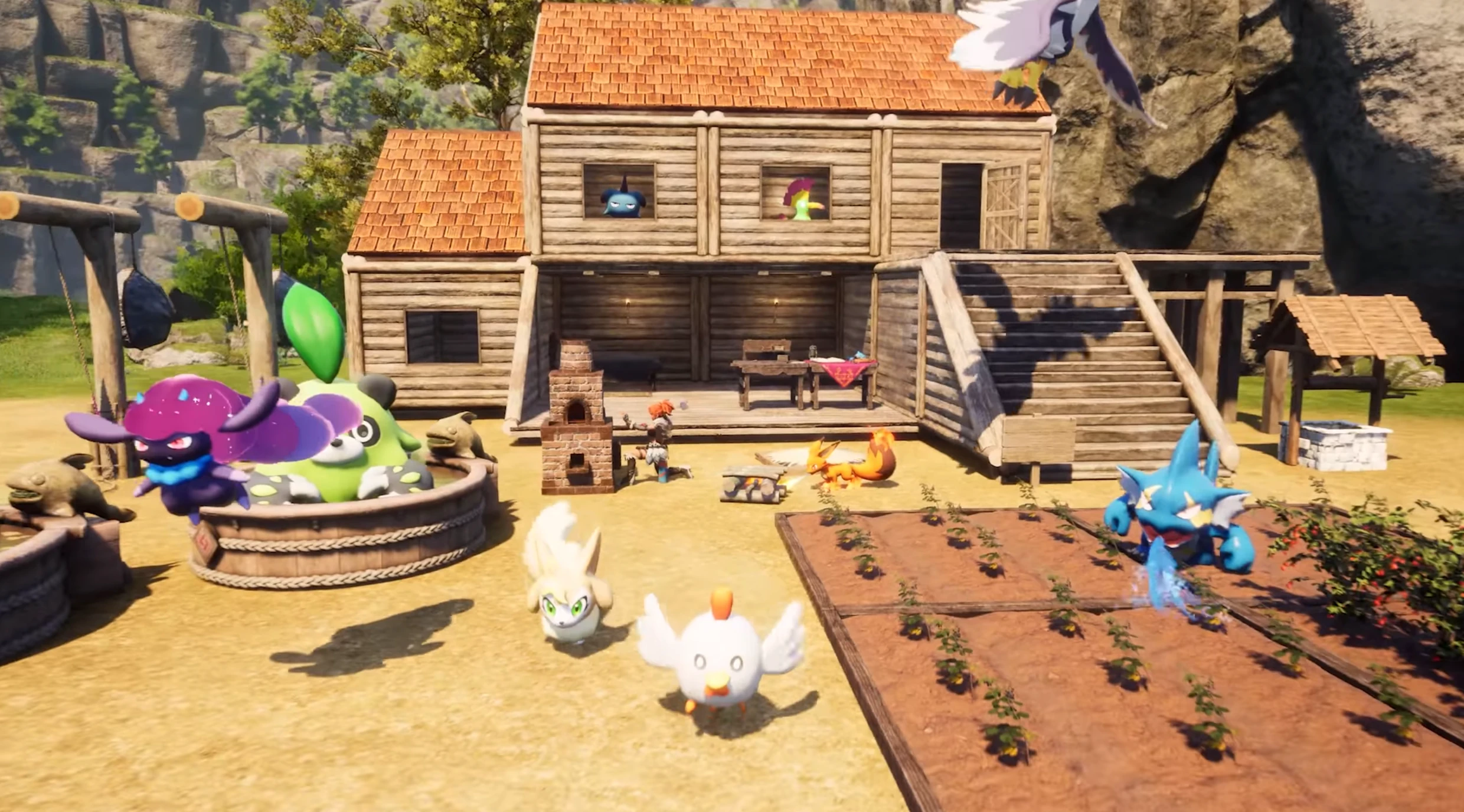
Palworld offers a unique twist on the creature-collection genre. It combines elements of survival, crafting, and exploration with the core concept of capturing and training creatures, known as Pals. Unlike Pokémon, Palworld introduces more mature themes, where Pals can be used not just in battles but also for labor, crafting, and even as part of the game’s survival mechanics. The game offers a grittier, more realistic approach to the world of creature collection.

Pokémon

Pokémon is a series beloved for its charming and whimsical approach to creature collection and training. The core gameplay revolves around capturing Pokémon, training them, and battling against other trainers. Its focus is more on adventure, exploration, and the bonds formed between trainers and their Pokémon. The series has maintained a family-friendly atmosphere throughout its various iterations, making it accessible to a wide audience.

Visual and Artistic Style

Palworld and Pokémon differ significantly in their visual presentation. Palworld opts for a more realistic and detailed graphic style, catering to an older audience. In contrast, Pokémon consistently features a colorful, cartoon-like aesthetic that appeals to both younger players and those seeking nostalgia.

Target Audience and Themes

The target audience of Palworld is evidently more mature, given its inclusion of survival elements and the usage of Pals for labor and combat. Pokémon, on the other hand, continues to target a broader, family-oriented audience, focusing on themes of friendship, adventure, and the joy of exploration.

Summary

Both Palworld and Pokémon offer unique experiences within the creature-collection genre. Your choice between the two depends on your personal preferences for gameplay, thematic elements, and visual style. Whether you prefer the survival and crafting aspects of Palworld or the classic, adventure-driven world of Pokémon, both games provide rich, immersive experiences in their own right.
Palworld Bugs: Common Issues, Fixes, and What Pocketpair Is Patching

Palworld Bugs: Common Issues, Fixes, and What Pocketpair Is Patching

Palworld bugs have hit hard after launch—from server instability to lost saves—but most have workarounds or patches on the way. Here’s what’s broken, what Pocketpair is fixing, and what you can do right now.

  • Palworld bugs: server overload, multiplayer glitches, and save loss
  • Hotfix status and how to recover lost data
  • Quick player-side fixes while you wait for patches
Palworld bugs server instability and fixes
Record launch numbers strained Palworld servers, leading to early bugs and instability.

Palworld bugs after the big launch

Since launch, Palworld has sold millions of copies and surged past one million concurrent Steam players. That popularity exposed several Palworld bugs: server instability, multiplayer desync, and the dreaded lost save data reports (over 50,000 filed). Early access titles often hit teething issues, but the volume here is large.

Server instability and multiplayer issues

  • Symptoms: Timeouts joining worlds, rubber-banding, or failed lobby connections.
  • Workarounds: Retry off-peak hours; if self-hosting, restart the server and verify open ports; reduce player count temporarily.
  • Dev status: Pocketpair is scaling infrastructure and tuning netcode to handle the surge.

Lost save data and recovery options

  • Symptoms: Missing characters/worlds after a crash or disconnect.
  • Workarounds: Back up local saves regularly; avoid force-closing during autosaves; if affected, follow Pocketpair’s recovery form instructions.
  • Dev status: The team has offered limited restore support via a Google form and is improving save handling.

Other Palworld bugs to watch

  • Quest/UI glitches: Try verifying files; toggle UI scaling; relog.
  • Crash to desktop: Update GPU drivers; verify game files; lower shadows/foliage as a temporary stabilizer.
  • Xbox/GP issues: Keep the client updated; restart the app; watch for platform hotfixes.

What Pocketpair is patching

Developers are prioritizing three fronts: (1) server accessibility and scaling, (2) multiplayer stability, and (3) safer save writes to prevent data loss. Expect frequent hotfixes while they iterate.

Player checklist while waiting for fixes

  • Back up saves before big sessions or patches.
  • Play during off-peak times to avoid overloaded servers.
  • Keep drivers/game files updated; verify after crashes.
  • Report Palworld bugs with repro steps to speed fixes.

Need a more stable place to play with friends? Check our Palworld server hosting guide to reduce disconnects and keep worlds backed up.

Resolve the Palworld server update that erases player progress.

We acknowledge that losing progress on your Palworld server can be annoying, and we are sorry if you have encountered any difficulties. It has been determined that there is a definite bug in the game, and the developer needs to address it in order to fix it. This serious bug is known to the developer, and fixing it is probably their top priority. This problem is now plaguing many hosting providers, including official servers, and is impacting a lot of players.

For now there is no 100% successful method to recover your data, however some players reported those workaround as successfull.

Method 1

Have one player join the server (BUT DO NOT CREATE A NEW CHARACTER), simply just stay in the new character creation menu.

  • Now Stop the server.
  • Wait 10-15 minutes.
  • Start the server.
After that, your character's progress should be back, and you can continue playing.

Method 2

Look through the folder that player and world data are kept in on the Palworld dedicated server. You can find that folder in "Game Data" section in files manager.

It is likely that server files are contained in a folder with the name 0 (the number zero).

Go to 0 and open the folder. The good news is that your Palworld server still has your older server files if you have more folders here. If you open one of those directories, it should includes: Players, Level.sav and LevelMeta.sav

A snapshot of the playerdata folder on a Palworld server The "ID" of the server version is a random string of characters that you must notice in the folder name. Once your server is up and running, you might have two folders, each with a unique random ID. Select the folder you wish to restore by looking at its last changed date before proceeding to the next step.

Getting the Saved Data Reference Back
Open the GameUserSettings.ini (switch from "Game Data" to "Server Config") after that. Palworld lost save data fix Change the DedicatedServerName entry in this file to the ID found in the folder in the previous step. You may need a different ID from a different folder if the ID from the previous step is already visible in this line.

Still not functioning?

Even while many users find success with this step, there are still some situations in which your server will not recognize your player and server data. Fear not, as there is one last thing you may do that has supposedly helped a lot of players:

  1. Edit GameUserSettings.ini and clear ID from the option: DedicatedServerName=
  2. Launch the Palworld server.
  3. You should be prompted to create a new character when you join the server. Join the Palworld server and make a new character.
  4. Once more, stop your Palworld server.
  5. After completing it in the preceding step, change the map ID back to the old value.
  6. Launch your server, and you ought to be able to connect using your other character from before.

Method 3

A community-maintained save-merge tool, palfix, can rejoin a duplicated player file back into the original profile in one step. It works directly on the .sav files and skips the manual GameUserSettings.ini juggling described above. Stop the server, point it at the world folder, and pick the old and new player IDs to merge.

Palworld – How to connect a server?


How to Connect to a Palworld Server

Your Palworld server has its own address (an IP and port) shown in your Supercraft panel. Palworld supports cross-platform play between Steam, Xbox / Game Pass PC, and PlayStation 5, but the way each platform joins a server is different. Steam players have the most flexibility (direct connect or community list); Xbox and PS5 players can only join via the in-game community server list. Steps for each platform are below.

Method 1: Direct Connect on Steam

The fastest way for a Steam player to join your server.

  1. Launch Palworld and choose MultiplayerJoin Multiplayer Game (Dedicated Server).
  2. At the bottom of the server browser, find the IP entry field.
  3. Enter the IP and port from your Supercraft panel exactly as shown (for example, w1.supercraft.host:8211) and click Connect.
  4. If the server has a password, you’ll be prompted to enter it. Use the password shown as Server password in your panel.

Method 2: Community Server List (Steam, Xbox, PS5)

This is the only join path for Xbox / Game Pass PC and PS5 players. Make sure your server’s PublicServer setting is enabled (it is by default on Supercraft).

  1. Launch Palworld and choose MultiplayerJoin Multiplayer Game (Dedicated Server).
  2. Use the search bar at the top to find your server by name.
  3. The community list can take a few minutes to refresh after a fresh server boot — retry if your server isn’t there yet.
  4. Click Connect, enter the server password if prompted, and join.

Method 3: Add to Steam Favorites (optional)

Useful for Steam players who want the server to appear in the Steam Game Servers window, separate from the in-game browser.

  1. Open Steam › ViewGame Servers.
  2. Switch to the Favorites tab and click the + (Add Server) button.
  3. Enter the IP and port from your Supercraft panel, click OK.

Troubleshooting

  • “Connection failed” right after purchase: A fresh Palworld server takes 2-4 minutes to finish booting and register with the community list. Wait, then retry. Direct Connect (Method 1) usually works sooner than the community list (Method 2).
  • Server doesn’t appear in the community list: Direct Connect bypasses the list and is unaffected by community-list lag. If Xbox or PS5 players need to join and your server isn’t listed, check that PublicServer is enabled in your panel’s server config. Restart the server after toggling.
  • Crossplay friends can’t find the server: Make sure crossplay is enabled in your panel’s server config. Different platforms search the same community list, but the server must explicitly opt in.
  • Wrong password / kicked back to menu: Palworld has both a server password and an admin password. Use the one shown as Server password in your panel for joining. The admin password is for in-game admin commands.
  • “This server is full”: Check the Players tab in your panel for the live count. Your plan’s max-player setting is enforced server-side.
  • Server is up but unreachable: Check the Logs tab in your panel. If the server is restart-looping or you see LogEOS: Error lines, the AI Server Doctor under the panel’s diagnostics will name the cause.

Back to Palworld hosting plans

Craftopia vs Palworld 2026: Which is Better (Combat, Building, Servers)


Palworld vs Craftopia

Introduction:

In today’s gaming landscape, where the blending of genres creates unique and captivating experiences, two titles have risen to prominence: Palworld and Craftopia. Both developed by Pocketpair, these games offer distinct takes on the survival, crafting, and adventure genres. As a writer for a gamers’ portal, I’ve delved deep into both games to bring you an in-depth comparison, helping you decide which world to immerse yourself in next.

Palworld vs Craftopia

Gameplay and Mechanics:

Palworld:

Palworld offers a unique blend of creature collection and survival mechanics. Set in an open-world environment, players can capture and train Pal creatures, reminiscent of Pokémon-style gameplay. What sets Palworld apart is its mature themes – Pals can be used in battles, for labor, or even crafting. Survival elements such as hunger, thirst, and weather conditions add to the game’s complexity.

Craftopia:

Craftopia combines elements from various genres, including crafting, survival, and action RPG. The game presents a more traditional survival experience with a vast open world. Players gather resources, craft items, build bases, and explore dungeons. The inclusion of farming and automation systems offers a unique twist, allowing for a more relaxed and creative gameplay experience.

Visual and Artistic Style:

Palworld:

Palworld features a vibrant, colorful world with a slightly more realistic art style. The creature designs are imaginative yet carry a certain grittiness. Environments are detailed, and weather effects add to the immersive experience.

Craftopia:

Craftopia opts for a more whimsical and cartoonish art style. The bright and cheerful visuals are reminiscent of games like The Legend of Zelda: Breath of the Wild. It creates a more light-hearted atmosphere that contrasts with the survival aspects of the game.

Multiplayer and Social Interaction:

Both Palworld and Craftopia offer multiplayer experiences, but with different focuses. Palworld leans towards cooperative and competitive creature battles, while Craftopia encourages collaboration in building, crafting, and exploring.

Content and Longevity:

Palworld:

Palworld’s creature collection and training offer a potentially endless gameplay loop, especially for players who enjoy min-maxing their Pals’ abilities and engaging in battles. The survival elements and crafting system add depth and challenge.

Craftopia:

Craftopia’s strength lies in its crafting and building systems, appealing to players who enjoy Minecraft-like creativity. Its automation systems and farming can lead to hours of gameplay, experimenting with different setups and designs.

Verdict:

Choosing between Palworld and Craftopia depends largely on what you seek in a game. If you’re drawn to creature collection with a mix of survival and darker themes, Palworld is your go-to. However, if you prefer a more traditional crafting and building experience with a whimsical twist, Craftopia will be more up your alley. Both games offer rich, engaging worlds full of possibilities, ensuring that whatever your choice, adventure awaits.

As a writer for a gamers’ portal, my aim is to provide a balanced view that caters to various gaming preferences. Both Palworld and Craftopia have their unique charms and challenges, making them worthy additions to any gamer’s library.


Palworld Server Hosting

Explore the vast world of Palworld with smooth, reliable dedicated servers from Supercraft. Our infrastructure is built to handle Palworld’s creature taming, survival, base-building, and co-op action without lag, so you can focus on your adventure instead of troubleshooting your server.

Enjoy the excitement of Palworld with our 99.9% uptime guarantee and strong security measures that protect your progress and creations. Our user-friendly control panel makes server management easy: configure settings, manage backups, and control access in just a few clicks.

Whether you’re collecting Pals, building your dream base, or teaming up for big fights, Supercraft delivers a stable, high-performance Palworld hosting solution so you and your friends can enjoy the game without interruptions.

Palworld Server Hosting Rental

Palworld Server Hosting, Fast Modded Cross-Region Servers

Zero Lag. 3-Minute Setup. The Ultimate Home for Your Pals

1-click mods uploader, FTP, backups, DDoS protection, best locations in North America, EU, the UK, and Australia.

Grab your friends and catch ‘em all on your own Supercraft server

Choose your discount
Trusted by 10k+ players · hosting since 2021

How to Choose the Right Server Hosting Plan

S - Starter

The gameplay on the server is optimized for those who are looking for a solid, stable basic hosting for a small team.

M - Most popular

At a great price, you receive a fast and stable server. Configuration is ready for larger teams and complex worlds. You can install server mods and play beta versions. For most players, this is the best option.

L - Power

The ideal option for larger teams and experienced settlers. With this plan you can go beyond casual player limits and run very complex mod setups. Our support team will also help you with mods setup and configuration.

Feature S M L
Player slots51030
CPU priority321
Mod support (Thunderstore and others)NoYesYes
Mod setup assistance from supportNoNoYes
Beta / unstable branchesNoYesYes
Automatic daily backupsYesYesYes
17 Tbit/s DDoS protectionIncludedIncludedIncluded
FTP / SFTP accessYesYesYes
RCONYesYesYes
Discord bot (start / stop / restart)NoYesYes
Scheduled restartsNoNoYes
Free region changeYesYesYes
Save importYesYesYes
Support priorityStandardStandardPriority
Pick your plan

Palworld server hosting is a dedicated server service that lets your group run an always-on Palworld world without using your own PC or console as the host. A hosted Palworld server handles creature AI, base simulation, and autosaves on powerful hardware, while your friends connect from anywhere. Supercraft runs Palworld on Intel Xeon nodes (192 GB RAM minimum) with NVMe storage, five global regions, and DDoS protection included. You can start in minutes, import an existing save, and manage settings in a simple control panel. For advanced setups, you can install supported mods, upload files via FTP/RCON, and roll back quickly using automatic snapshots if an update breaks your world.

Palworld 1.0 - the full launch on July 10, 2026

Pocketpair has confirmed Palworld leaves Early Access with version 1.0 on July 10, 2026, its biggest update yet: a new World Tree region and a second major island that roughly double the playable map, releasing the same day on PC, PS5, and Xbox. A hosted server is the easiest way in - launch a fresh 1.0 world to explore the expanded map from the start, or back up your current Early Access world on demand before the update lands. Your server picks up the 1.0 build through our managed updates and scales to the extra slots a bigger map and returning players will need, so you are ready on day one.

Optimized Palworld performance & backups

We run Palworld servers on Intel Xeon hardware (192 GB RAM minimum) with NVMe storage so base raids, breeding hubs, and mob-filled dungeons stay smooth. Automatic snapshots help you roll back fast after griefing or bad mod installs. Cross-region transfers let you move closer to your community without wiping progress.

Mod-friendly Palworld hosting

Install mods from Thunderstore in one click directly from the panel, or upload custom content via FTP/RCON. We keep popular Palworld mods up to date and provide quick restores if an update breaks your world. Console + Steam players can join with tuned configs that respect Palworld’s cross-play requirements. Enable RCON in server settings for admin commands, and use the panel’s save management tools to list, switch, or repair world saves on your Palworld dedicated server.

Live ops tools built in

Start from a difficulty preset (casual, normal, hard, or hardcore) instead of tuning dozens of sliders. Watch a live player list in the panel to see who’s online, and wire up a Discord webhook so starts, stops, crashes, and join/leave events post to your crew’s channel automatically.

Available regions: US West (Oregon), US East (Virginia), US North-East (Toronto), Europe West (Paris), Australia (Sydney).

PROMO: Buy Palworld - get access to Valheim, Satisfactory, Factorio & 8 more games. See all games

How much does Palworld server hosting cost in 2026?

Palworld hosting costs depend on how many players you want to support, how busy your world is (Pal AI, base density, breeding farms), and how often you need backups and restores. Supercraft plans start from $799 per month, with discounts on longer billing cycles shown in the plan selector above. Most small groups can start on Plan S or Plan M, then scale up later without wiping: increase slots in the panel, restart, and keep the same world. Reliable hosting value is driven by RAM for simulation-heavy worlds, CPU priority for stable tick rate during raids, and fast NVMe storage for autosaves and snapshot restores.

Running a larger community or want a fully managed box of your own? See our Palworld dedicated server hosting. Weighing value across providers first? Our best Palworld server hosting rundown ranks the options.

2-Day Money-Back Guarantee

Not happy in the first 48 hours? Cancel and get a refund - no questions, no forms. Try the server with your friends and only keep it if it’s the right fit.

After the refund window your plan stays month-to-month. Cancel any time from your account - no contracts.

Safe Payments

Checkout is handled by PayPal and Stripe with full PCI-DSS compliance. We never see or store your card details. Apple Pay and Google Pay work out of the box on supported devices.

Why Palworld players pick Supercraft

One-click mods

Install Palworld mods from the panel in a click - no SteamCMD, no zip juggling. FTP/SFTP access stays open for manual installs and config tweaks when you need it. We support all types of mods: Nexus, Thunderstore, CurseForge, GameBanana/ModDB and others

Mods stay live across restarts, and our team patches the launcher when Thunderstore changes its API.

Steam + Xbox crossplay

Dedicated servers join the same pool as Steam, Xbox PC, and Xbox Console Palworld clients. No separate worlds, no “sorry, wrong platform”. Easy but complete config panel means you control day length, taming speed, and base limits without a panel form gating you.

5 regions

US West (Oregon), US East (Virginia), Toronto, EU, UK, and Sydney - pick the closest to most of your players.

DDoS protection (17 Tbit/s scrubbing) and automated backups are included on every plan.

Setting up your Palworld server: first-day checklist

Setting up a Palworld server is mostly about making good choices before players join. Hardware, restart policy, world settings, and backup discipline all matter more than shaving a minute off the initial install.

Decisions to make before launch

  • Who is this for? A private friends server can prioritize convenience. A public or long-running world needs more conservative settings and better backups.
  • Where will it run? Self-hosting gives you full control. A managed panel reduces the operating-system work you do yourself.
  • How often will it restart? Palworld benefits from a clear restart schedule, especially once the map has been active for long sessions.

First-day setup checklist

  1. Create the world, set the name and password policy, and confirm your chosen difficulty values.
  2. Open the required network access or panel rules before inviting players.
  3. Join the server yourself and verify character creation, respawn, and base placement all work normally.
  4. Enable backups before you start experimenting with large settings or mods.
  5. Publish simple player rules for raids, building spots, and restart times.

Three early mistakes to avoid

  • Launching a world with default values you have not actually reviewed.
  • Inviting players before you test reconnects, restart behavior, and save creation.
  • Waiting until after the first crash to think about backup retention.

The official Palworld server guide distinguishes dedicated servers from community servers, and notes that consoles need the community-server path to join. That platform requirement is worth deciding before launch because it affects who can connect, how you share the server, and which troubleshooting tree you end up using later.

Latest Palworld guides & news

Palworld Dedicated Server Hosting

Past the 4-player co-op cap, or running a big base with heavy breeding? Our dedicated Palworld server hosting is a full managed machine - a persistent 24/7 world, more slots, and the CPU headroom Pals and bases demand.

Palworld 1.0 Roadmap - launches July 10, 2026

Confirmed at Summer Game Fest: 1.0 leaves Early Access on July 10 with a new World Tree region and a second island. What it means for dedicated-server admins - fresh worlds, backups, and the day-one update.

Palworld Server Progression Guide

Multiplayer carry-over tips, game pass integration, and power-leveling strategies.

Home Sweet Home Update & Base Tour

Explore the new base customization options and the ULTRAKILL collaboration.

Palworld Breeding Calculator

Optimize your breeding farms with our comprehensive calculator and guide.

Palworld Coal Locations & Mining Guide

Best spots to mine coal, base setups for automation, and essential recipes.

Update: A New Era for Building

Deep dive into the latest building mechanics and fun features added to Palworld.

Palworld Server Settings Reference

PalWorldSettings.ini deep dive - every flag, sane defaults, and which knobs actually change gameplay.

PvP Arena Server Setup

Configure your dedicated server for ranked PvP - arena rules, respawn behavior, ban-list workflow.

Character Migration v2

Move your character + pal collection between worlds, dedicated servers, and consoles - the official path.

Palworld Crossplay Setup (PC, Xbox, PS5)

The full crossplay guide: which platforms join together, what the host needs, and the settings that make mixed lobbies work.

Xbox / PC Crossplay Guide

Set up your dedicated server for Xbox + PC crossplay - UDP 8211, EOS sessions, version-pinning.

Known Issues (Live)

Maintained list of Palworld bugs that hit dedicated servers - character clone, port 8211 conflicts, save-corruption recovery.

Server Hardware Requirements

Sizing guide: how much RAM and CPU for 4 / 8 / 16 / 32 player dedicated servers, with current 2026 patch reality.

Palworld Admin Commands & Cheats

Full reference for dedicated-server console commands and admin-only options.

How to Pause a Palworld Server

Save bandwidth and avoid grief while you’re away - clean server-pause workflow for admins.

Palworld: Level Up Fast

Server-side XP curve adjustments + best gameplay loops for fast progression.

Switch Palworld Saves

Migrate between solo, friends-only, and dedicated saves without losing progress.

Palworld Connection Fixes

Diagnostics for “can’t connect to dedicated server” errors - port, EAC, and version-mismatch flow.

It’s easy to get started
Follow these quick steps to launch your dedicated game server with Supercraft.

1

Choose your plan

Select the best option for your needs

2

Create account

Or login if you have one

3

Make payment

Choose one of our secured payment methods

4

Select your region

Choose the closest location for the lowest ping

5

Install the game

Game will run automatically after installation

6

Connect!

You will have the port and IP in the management panel

  Check our hosting plans now!

Frequently asked questions

Yes. Renting a Palworld dedicated server takes about two minutes: pick a plan above, choose monthly or a longer term to save, and your server goes live with crossplay, one-click mods, and automatic backups. Monthly billing, no long contract, cancel anytime.

Yes. We keep configs aligned with the current Palworld cross-play rules so Steam and Xbox players can join the same world without extra port tinkering.

Install Thunderstore mods in one click from the panel or upload manually via FTP. We snapshot before updates so you can roll back if a Palworld patch or mod breaks the server.

Yes. Upload your save folder, restart from the panel, and keep your base, Pals, and items intact. We can assist if you’re moving from another host.

US West (Oregon), US East (Virginia), US North-East (Toronto), Europe West (Paris), and Australia (Sydney). Move regions without wiping your world.

Plans scale up to 32 players. Change slots in the panel and restart; no reinstallation needed.

Use our configuration panel or edit files directly. See our complete Palworld Server Configuration Guide for all available settings, parameters, and their effects on gameplay.

Palworld server hosting cost depends mostly on server resources and world activity. Plans with more RAM handle larger bases, breeding hubs, and busy Pal AI better, while higher CPU priority helps keep simulation smooth during raids and peak hours. Fast NVMe storage improves autosaves and makes restores quicker. On Supercraft, Palworld plans start from $799 per month, with lower effective monthly pricing on longer billing cycles. We include DDoS protection and automatic snapshots at no extra cost.

Yes. In My Account → Subscriptions, you can upgrade to a higher tier of the same game with the same billing cadence. During an upgrade, your deployment is updated in place (quota update + restart), not wiped and recreated.

A Palworld server starts at $799 per month on Supercraft. Plan S covers up to 5 players; Plan M scales to 10; Plan L for 10+ groups. Annual billing drops the effective monthly rate further. No setup fees, no DDoS upcharges, no backup add-ons.

Cheap Palworld server hosting usually means lower RAM caps, slower CPUs, charged-extra DDoS protection, or no backups. Our entry plan is priced for cost-conscious groups but still runs on Intel Xeon hardware with NVMe storage and uncapped RAM, includes daily snapshots, includes 17 Tbit/s DDoS filtering at no extra cost, and lets you switch to another supported game without losing your billing cycle.
For 2-4 friends running mostly-vanilla Palworld, Plan S is the best fit. For 5-10 players, modded servers, or a community with breeding hubs and high Pal AI density, Plan M is the sweet spot. Plan L is for larger communities and modded events. Pick the region closest to most of your players from US West, US East, Toronto, Paris, or Sydney. You can change region without wiping the world.

The price you see is the price you pay. Included on every Palworld plan: full mod support (Thunderstore one-click + manual via FTP), automatic backups, 17 Tbit/s DDoS protection, RCON, FTP/SFTP file access, scheduled restarts, free region change, and our custom panel with a Discord bot for remote start/stop/restart. No upcharges for slot increases short of a plan upgrade. No charge for daily snapshot backups. No extra for cross-region moves.

Ready to launch your Palworld server?

Why choose Supercraft as your next dedicated server hosting provider?
Core benefits of our dedicated game server hosting: resilient network, fast hardware, admin control, simple mods, and responsive support.


DDoS protection

Best attack protection with 17Tbit/s filtering capacity

Full control

Get full access to all options, browse logs, and use the admin console.

Best hardware

Our services run on high-clock multi-core CPUs with NVMe storage and generous RAM allocations.

Lightning-fast network

Game experience free of lags and glitches; recent Trustpilot reviews note steady low ping across regions.

Configuration for experts

Advanced administration options allow you to fine-tune your game experience. FTP and RCON.

Safe Payments

We use only trusted payment gateways: PayPal and Stripe, and we never process credit card information directly.

Mods & Maps easier than ever

With our custom panel, mods install in one click through each game's native mod ecosystem. Depending on the game that means Steam Workshop, Thunderstore, Satisfactory Mod Manager, Factorio Mod Portal, CurseForge, Vintage Story Mod DB, or a direct .zip upload.

Backups & scheduled restarts

Automatic snapshots of your world plus configurable scheduled restarts keep your server healthy without lifting a finger.

AI Server Doctor

Our built-in AI Server Doctor reads your logs and config to diagnose crossplay, connection, and setup problems, then offers one-click safe fixes. Diagnosis credits are included with your plan, on every supported game.

24/7 Support

Send us an email, use our online form, or reach us directly on Discord to get fast help; players often receive answers within minutes.

Available Regions

Hosting regions: US West (Oregon), US East (Virginia), US North-East (Toronto), Europe West (Paris), Australia (Sydney).
Europe: Paris • North America: US West (Oregon), US East (Virginia), US North-East (Toronto) • Australia: Sydney

Powerful Dedicated Game Servers at a Price You’ll Love!

We host dedicated servers for 20+ games including Valheim, Palworld, Satisfactory, Minecraft Java, Minecraft Bedrock, 7 Days to Die, Project Zomboid, Factorio, Terraria, Enshrouded, Necesse, V Rising, Vintage Story, Rust, HumanitZ, ARK: Survival Evolved, ARK: Survival Ascended, Counter-Strike 2, Unturned, Windrose, Hytale, Sons of the Forest, The Forest, and Echoes of Elysium. Established in 2020, we've served over 40,000 customers with fast, reliable dedicated servers and hold a 4.3/5 Trustpilot rating from 350+ reviews that highlight our 2-5 minute setup, low ping across 5 global regions, and responsive Discord support. Explore featured servers like ARK: Survival Evolved hosting, ARK: Survival Ascended hosting, Minecraft Java hosting, Minecraft Bedrock hosting, Palworld hosting, Valheim hosting, Rust hosting, Satisfactory hosting, Factorio hosting, and 7 Days to Die servers.

PROMO: Switch to supported games at the same price or below. ARK: Survival Evolved and ARK: Survival Ascended unlock the full catalog, including each other. See all games

What you get:

  • Powerful hardware & low ping in 5 global regions
  • 99.9% uptime backed by 17 Tbit/s DDoS protection
  • User-friendly control panel with live player list
  • One-click mods per game (Steam Workshop or Thunderstore) & FTP
  • Automatic snapshots & scheduled restarts
  • Discord webhooks & in-panel RCON console
  • Fast, hands-on support on Discord & email
  • Switch across supported games at any time
  • 2-day refund available & safe payments
                 

Game Server Platform

Host dedicated servers for survival, sandbox, and factory games with Supercraft. Enjoy smooth performance and full control while you explore the Viking realms of Valheim, survive the apocalypse in 7 Days to Die, automate sprawling factories in Satisfactory or Factorio, fight zombies in Project Zomboid, adventure with Pals in Palworld, uncover mysteries in Enshrouded, dig deep in Terraria, build settlements in Necesse, host cross-platform worlds in Minecraft Java, Minecraft Bedrock, hunt as a vampire in V Rising, survive in Vintage Story, raid and build in Rust, or outlast the undead in HumanitZ. Every plan includes game switching - buy one server and deploy supported games at the same price or below, directly from your control panel. ARK: Survival Evolved and ARK: Survival Ascended sit at the top tier, so either ARK plan can switch to every supported game, including the other ARK, while lower-priced plans cannot switch up into either ARK game. Our hosting is designed for stable gameplay, reliable uptime, and hassle-free management, with Trustpilot players calling out low ping and quick setup.

Spin up your world in minutes with low-latency hardware, straightforward controls, and responsive support. Tweak server rules, invite friends instantly, and keep progress safe so you can focus on building, raiding, crafting, or simply surviving together - switch games when you want a change, and our team backs you up on Discord if you ever need a fast fix or mod help.

One Control Panel, Smarter Game Switching

Buy a server for one game and switch to supported games from your control panel at no extra cost when they match your current plan or sit below it. ARK: Survival Evolved and ARK: Survival Ascended sit at the top tier, so either ARK plan can switch across the full catalog, including the other ARK. Customize world settings, install mods with one click, and manage files over FTP across 5 global regions.

Why choose Supercraft as your next dedicated server hosting provider?

Core benefits of our dedicated game server hosting: resilient network, fast hardware, admin control, simple mods, and responsive support.

DDoS protection

Best attack protection with 17Tbit/s filtering capacity

Full control

Get full access to all options, browse logs, and use the admin console.

Best hardware

Our services run on high-clock multi-core CPUs with NVMe storage and generous RAM allocations.

Lightning-fast network

Game experience free of lags and glitches; recent Trustpilot reviews note steady low ping across regions.

Configuration for experts

Advanced administration options allow you to fine-tune your game experience. FTP and RCON.

Safe Payments

We use only trusted payment gateways: PayPal and Stripe, and we never process credit card information directly.

Mods & Maps easier than ever

With our custom panel, mods install in one click through each game's native mod ecosystem. Depending on the game that means Steam Workshop, Thunderstore, Satisfactory Mod Manager, Factorio Mod Portal, CurseForge, Vintage Story Mod DB, or a direct .zip upload.

Backups & scheduled restarts

Automatic snapshots of your world plus configurable scheduled restarts keep your server healthy without lifting a finger.

AI Server Doctor

Our built-in AI Server Doctor reads your logs and config to diagnose crossplay, connection, and setup problems, then offers one-click safe fixes. Diagnosis credits are included with your plan, on every supported game.

24/7 Support

Send us an email, use our online form, or reach us directly on Discord to get fast help; players often receive answers within minutes.

Discord bot controls for your game server
Discord bot

Self-Serve Bot in Discord

Instant control of your game server without tickets or waiting. Type a command and go.

  • Start, stop, restart, and check status in seconds.
  • Secure by design: only your subscriptions are accessible.
  • Share access safely with time-limited auth codes.

Fast, secure, and always on.

Discord chat commands for game server management

Available Regions

Hosting regions: US West (Oregon), US East (Virginia), US North-East (Toronto), Europe West (Paris), Australia (Sydney).
Europe: Paris • North America: US West (Oregon), US East (Virginia), US North-East (Toronto) • Australia: Sydney

Top